Why a browser zero-day is a business problem, not an IT footnote
Google has now patched eight actively exploited Chrome zero-days in 2026, according to The Hacker News. The latest, CVE-2026-125350, is a use-after-free bug in Chrome's XML component. The National Vulnerability Database shows a CVSS score of 8.8 from CISA-ADP; NIST hasn't scored it yet. CISA describes it as a flaw that could let a remote attacker "execute arbitrary code inside the sandbox via a specially crafted webpage." In plain terms, a visit to the wrong page is enough.
Google's November 9 release notes say it is "aware that an exploit for CVE-2026-125350 exists in the wild," and Google says access to bug details may be kept restricted until a majority of users are updated. The browser is where remote teams sign in to Microsoft 365 and Google Workspace and use the AI tools they now depend on (see What AI Tools Are Small and Mid-Sized Businesses Actually Using?). Attacker code running in that browser is running where those sessions live.

"Updated" is not "patched" until the browser relaunches
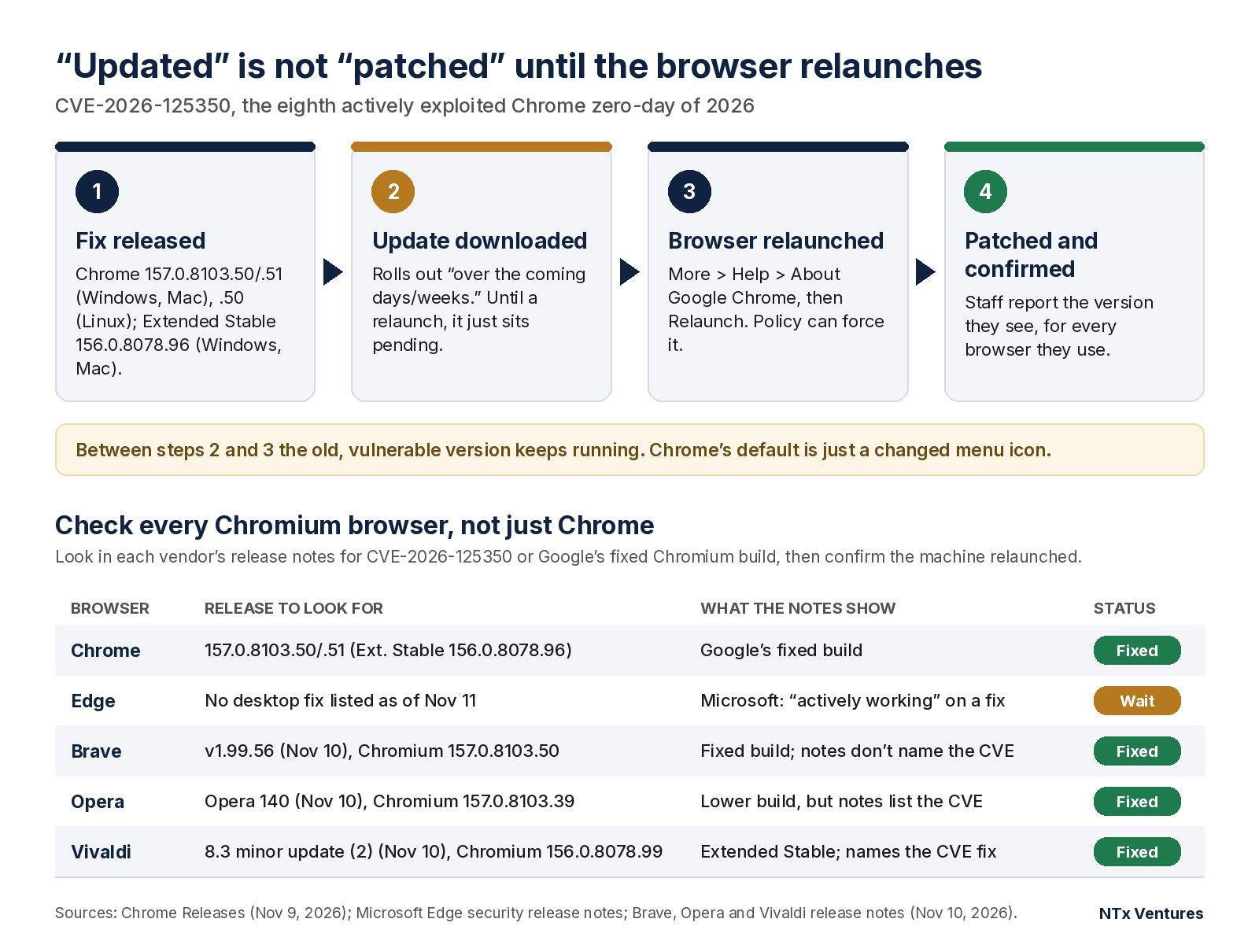
Google's fix protects a machine only after it downloads the update and the browser relaunches. The fixed versions are Chrome 157.0.8103.50/.51 for Windows and Mac and 157.0.8103.50 for Linux. Extended Stable channel users need 156.0.8078.96 for Windows and Mac.
Two details catch businesses out. First, Google says these builds "will roll out over the coming days/weeks," so auto-update may not have reached every laptop yet. Second, a downloaded update sits pending until Chrome restarts. Chrome Enterprise Help explains that by default, Chrome only changes its More menu icon to show an update is waiting. If someone keeps their browser open for days, the patch doesn't apply for days.
The check is quick: More > Help > About Google Chrome, then Relaunch (The Hacker News). Ask every team member to do it and report the version they see, for every browser they use.
Check every Chromium browser your team uses, not just Chrome
The bug is in Chromium code that Chrome shares with Edge, Brave, Opera and Vivaldi, and each vendor ships the fix on its own schedule. CISA's KEV entry warns that it "could affect multiple web browsers that utilize Chromium, including, but not limited to, Google Chrome, Microsoft Edge, and Opera."
Where each vendor stood at the time of writing:
- Microsoft Edge: Microsoft's November 9 security release notes said it was "actively working on releasing a security fix." As of November 11, no newer desktop Edge release had appeared there. Don't tick Edge off until a release that names CVE-2026-125350 does.
- Brave: v1.99.56 (November 10) upgraded to Chromium 157.0.8103.50, Google's fixed build, though its notes don't name the CVE.
- Opera: Opera 140 (November 10) runs on Chromium 157.0.8103.39, which is lower than Google's fixed build, yet its notes list CVE-2026-125350 as fixed.
- Vivaldi: Minor update (2) for Desktop 8.3 (November 10) is on Chromium 156.0.8078.99 (Extended Stable) and names the CVE-2026-125350 fix.
The Opera and Vivaldi releases show why version numbers mislead. Vendors can carry a fix into an older Chromium build (Vivaldi says its update "includes security fixes from Chromium 157"), so a Chromium number alone can't tell you whether a browser is safe. Instead, look in each vendor's release notes for the CVE or Google's fixed Chromium build, then confirm that machines are running that release and have relaunched.
A simple standing policy for the next emergency patch
Eight in one year justifies writing a standing policy once.
Manage browser updates centrally. Chrome and Edge both let administrators enforce update and relaunch behavior through policy. Apply the same admin discipline you use for AI tools (see our ChatGPT setup guide for teams and Gemini setup guide for teams).
Shorten the forced-relaunch window. In Chrome, set the RelaunchNotification policy to require a relaunch, and use RelaunchNotificationPeriod to set the countdown: 1 to 168 hours in the Admin console, or seven days if left unset. In Edge, set RelaunchNotification to Required; its RelaunchNotificationPeriod also defaults to one week. A week is a long time to leave an actively exploited bug open, so set a shorter window and tell staff when the relaunch will happen. Edge restores the user's session when it restarts.
Spot-check every machine, in every browser, after each emergency patch. Treat CISA's deadline as your outer limit, not your target. CISA added this bug to the KEV catalog on November 10 with a federal deadline of November 24, 2026, 14 days later.
If your devices aren't centrally managed, name one person to own this. On the day an emergency patch lands, that person makes sure every browser on every machine has been relaunched and checked, and records who has confirmed.
We can help you with that.
NTx AI Consulting works with owner-led and partner-led privately held businesses that are currently using AI tools in everyday workflows, or would like to be. The complimentary consultation is a working session, not a product demo. If a deeper engagement makes sense, Phase 1 is an AI Disruption Readiness Audit. You can learn more at https://ntx.ventures/ai-consulting/.
Sources
- The Hacker News, “Google Issues Chrome Security Update for Eighth Actively Exploited Zero-Day of 2026,” November 10, 2026. https://thehackernews.com/2026/11/google-issues-chrome-security-update.html
- Google Chrome Releases, “Stable Channel Update for Desktop,” November 9, 2026. https://chromereleases.googleblog.com/2026/11/stable-channel-update-for-desktop_018223192.html
- Google Chrome Releases, “Extended Stable Update for Desktop,” November 9, 2026. https://chromereleases.googleblog.com/2026/11/extended-stable-update-for-desktop_0910980127.html
- NVD, CVE-2026-125350 (CVSS v3.1 8.8 from CISA-ADP; NIST score not yet provided). https://nvd.nist.gov/vuln/detail/CVE-2026-125350
- CISA Known Exploited Vulnerabilities catalog, CVE-2026-125350, date added November 10, 2026, due date November 24, 2026. https://www.cisa.gov/known-exploited-vulnerabilities-catalog?field_cve=CVE-2026-125350
- Chrome Enterprise and Education Help, “Notify users to restart to apply pending updates.” https://support.google.com/chrome/a/answer/7679871?hl=en
- Microsoft Learn, “Release notes for Microsoft Edge Security Updates” (checked November 11, 2026). https://learn.microsoft.com/en-us/deployedge/microsoft-edge-relnotes-security
- Microsoft Learn, Microsoft Edge policy RelaunchNotification. https://learn.microsoft.com/en-us/deployedge/microsoft-edge-browser-policies/relaunchnotification
- Microsoft Learn, Microsoft Edge policy RelaunchNotificationPeriod. https://learn.microsoft.com/en-us/deployedge/microsoft-edge-policies/relaunchnotificationperiod
- Brave, Release Notes v1.99.56, November 10, 2026. https://brave.com/latest/
- Opera Desktop blog, “Opera 140 Stable,” November 10, 2026. https://blogs.opera.com/desktop/2026/11/opera-140-stable/
- Ruarí Ødegaard, “Minor update (2) for Desktop 8.3,” Vivaldi blog, November 10, 2026. https://vivaldi.com/blog/desktop/minor-update-two-8-3/